> ## Documentation Index
> Fetch the complete documentation index at: https://docs.risingwave.com/llms.txt
> Use this file to discover all available pages before exploring further.
# Cloud metadata
> View and use the identity, private connectivity, and egress metadata exposed for AWS and GCP clusters in the RisingWave Cloud Console.
RisingWave Cloud exposes a set of environment-specific metadata values for each cluster. These values are required when setting up cross-account access (IAM role assume on AWS, Workload Identity on GCP), PrivateLink or Private Service Connect connections from RisingWave Cloud to services in your VPC, and Serving PrivateLink (AWS) or Serving Private Service Connect (GCP) connections from your VPC to RisingWave Cloud. All values are read-only and are generated automatically when a cluster is created.
## Where to find cloud metadata
In the [RisingWave Cloud Console](https://cloud.risingwave.com), go to your cluster and click **Network Access** in the left sidebar. Then select the **Cloud Meta** tab.
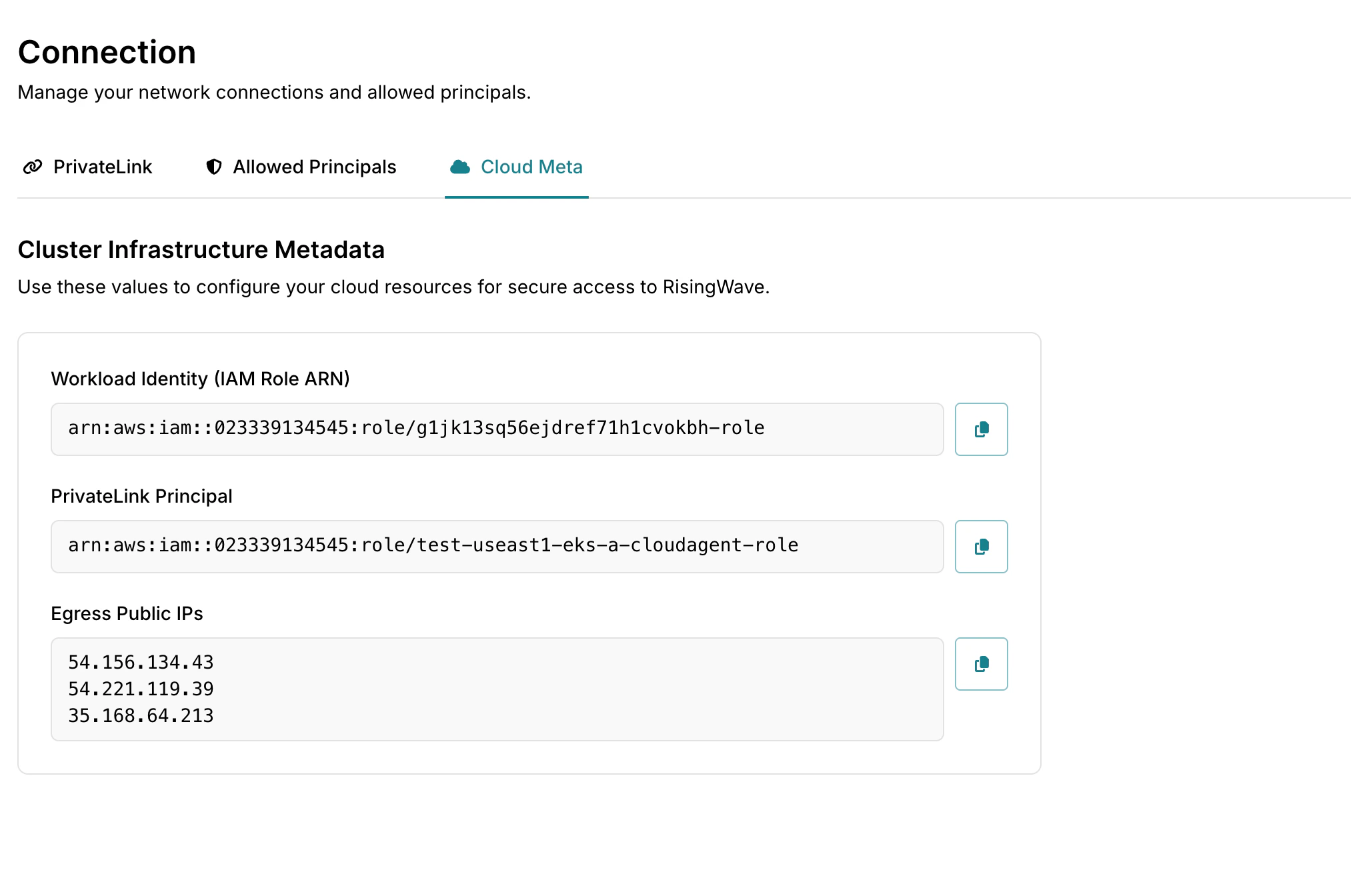 Cloud metadata is only available for projects on the **Standard** plan or above.
## Metadata fields
### Workload Identity (IAM Role ARN)
| Field | Example value |
| :----------------------------------- | :--------------------------------------------------------------- |
| **Workload Identity (IAM Role ARN)** | `arn:aws:iam::023339134545:role/g1jk13sq56ejdref71h1cvokbh-role` |
The AWS IAM role ARN that RisingWave Cloud uses to access AWS resources on behalf of this project. When you configure [IAM role assume](/cloud/iam-role-assume) (cross-account S3 access), you add this ARN as a trusted principal in your IAM role's trust policy.
### PrivateLink principals
| Field | Example value |
| :------------------------- | :------------------------------------------------------------------ |
| **PrivateLink principals** | `arn:aws:iam::023339134545:role/test-useast1-eks-a-cloudagent-role` |
The AWS principals associated with the RisingWave Cloud deployment that hosts your project. When you create a PrivateLink endpoint service in your AWS account, add these principals to the list of **Allowed principals** so that RisingWave Cloud can connect to your service.
### Serving PrivateLink
The **Serving PrivateLink** card lets you connect to RisingWave Cloud privately from your own AWS VPC, without routing traffic over the public internet. RisingWave Cloud creates an AWS endpoint service on its side; you then create an [AWS Interface VPC Endpoint](https://docs.aws.amazon.com/vpc/latest/privatelink/create-interface-endpoint.html) in your VPC to connect to it.
#### Endpoint Service Name
| Field | Example value |
| :------------------------ | :-------------------------------------------------------- |
| **Endpoint Service Name** | `com.amazonaws.vpce.us-east-1.vpce-svc-0a1b2c3d4e5f6a7b8` |
The name of the AWS endpoint service created by RisingWave Cloud for your project. Use this value when creating an Interface VPC Endpoint in your own AWS account:
1. Open the [Amazon VPC Console](https://console.aws.amazon.com/vpc/) and navigate to **Endpoints** → **Create endpoint**.
2. Select **Other endpoint services** and paste the **Endpoint Service Name** into the **Service name** field.
3. Choose the VPC and subnets from which you want to access RisingWave Cloud.
4. Complete the endpoint creation. The endpoint remains in a **Pending acceptance** state while RisingWave Cloud reviews and approves the request. Approval is automatic for endpoints in the same AWS account. If you are using a different AWS account, contact our [support team](mailto:cloud-support@risingwave-labs.com) to have the endpoint approved.
#### Private Endpoint
| Field | Example value |
| :------------------- | :--------------------------------------------------------------------------------------------- |
| **Private Endpoint** | `vpce-0a1b2c3d4e5f6a7b8-xyz12345.vpce-svc-0a1b2c3d4e5f6a7b8.us-east-1.vpce.amazonaws.com:4566` |
The hostname and port to use when connecting to RisingWave Cloud privately from your VPC, after the Interface VPC Endpoint is provisioned and accepted. Replace the public RisingWave Cloud hostname with this value in your connection strings and client applications.
The **Private Endpoint** value is only available after the Interface VPC Endpoint in your AWS account transitions to the **Available** state. If the field is empty, the endpoint has not yet been accepted or provisioned.
For more information, see [PrivateLink overview](/cloud/privatelink-overview).
### Workload Identity (GSA)
| Field | Example value |
| :-------------------------- | :--------------------------------------------------- |
| **Workload Identity (GSA)** | `rwc-abc123@example-project.iam.gserviceaccount.com` |
The Google service account that RisingWave Cloud uses to access Google Cloud resources on behalf of this project. Grant this service account the permissions required to access your resources.
### PSC project
| Field | Example value |
| :-------------- | :------------- |
| **PSC project** | `123456789012` |
The Google Cloud project associated with RisingWave Cloud Private Service Connect (PSC) connections. Use this value when authorizing RisingWave Cloud to connect to a service published from your VPC through PSC.
### Serving Private Service Connect
The **Serving Private Service Connect** card contains the values required to connect to RisingWave Cloud privately from your Google Cloud VPC.
| Field | Example value |
| :------------------------- | :-------------------------------------------------------------------------------- |
| **Service attachment URI** | `projects/example-project/regions/us-central1/serviceAttachments/rwproxy-serving` |
| **DNS suffix** | `privatelink.example.com` |
| **Private endpoint** | `rwc-abc123.privatelink.example.com:4566` |
Create a PSC endpoint that targets the **Service attachment URI**. Then create a private DNS zone for the **DNS suffix** and add a wildcard A record that points to the PSC endpoint IP address. Use the **Private endpoint** hostname and port in your connection strings and client applications.
For more information, see [PrivateLink overview](/cloud/privatelink-overview).
### Egress public IPs
| Field | Example value |
| :-------------------- | :--------------------------- |
| **Egress public IPs** | `203.0.113.10, 203.0.113.11` |
The public IP addresses from which outbound traffic from this project originates. Add these IPs to the allowlist of any firewall rules or security groups that restrict inbound access to your services (for example, a database or Kafka cluster that RisingWave connects to).
## Cloud metadata by platform
| Metadata | AWS field | GCP field |
| :-------------------------- | :------------------------------- | :------------------------------ |
| Workload identity | Workload Identity (IAM Role ARN) | Workload Identity (GSA) |
| Private connection identity | PrivateLink principals | PSC project |
| Serving private connection | Serving PrivateLink | Serving Private Service Connect |
| Service target | Endpoint service name | Service attachment URI |
| DNS metadata | — | DNS suffix |
| Connection endpoint | Private endpoint (`host:port`) | Private endpoint (`host:port`) |
| Outbound addresses | Egress public IPs | Egress public IPs |
## Next steps
* [Set up IAM role assume](/cloud/iam-role-assume) — use the IAM role ARN to grant RisingWave Cloud cross-account S3 access.
* [Configure PrivateLink](/cloud/create-a-connection) — use the PrivateLink principals when setting up your endpoint service's allowed principals.
* [PrivateLink overview](/cloud/privatelink-overview) — learn how RisingWave Cloud uses PrivateLink for private connectivity between your VPC and RisingWave Cloud.
Cloud metadata is only available for projects on the **Standard** plan or above.
## Metadata fields
### Workload Identity (IAM Role ARN)
| Field | Example value |
| :----------------------------------- | :--------------------------------------------------------------- |
| **Workload Identity (IAM Role ARN)** | `arn:aws:iam::023339134545:role/g1jk13sq56ejdref71h1cvokbh-role` |
The AWS IAM role ARN that RisingWave Cloud uses to access AWS resources on behalf of this project. When you configure [IAM role assume](/cloud/iam-role-assume) (cross-account S3 access), you add this ARN as a trusted principal in your IAM role's trust policy.
### PrivateLink principals
| Field | Example value |
| :------------------------- | :------------------------------------------------------------------ |
| **PrivateLink principals** | `arn:aws:iam::023339134545:role/test-useast1-eks-a-cloudagent-role` |
The AWS principals associated with the RisingWave Cloud deployment that hosts your project. When you create a PrivateLink endpoint service in your AWS account, add these principals to the list of **Allowed principals** so that RisingWave Cloud can connect to your service.
### Serving PrivateLink
The **Serving PrivateLink** card lets you connect to RisingWave Cloud privately from your own AWS VPC, without routing traffic over the public internet. RisingWave Cloud creates an AWS endpoint service on its side; you then create an [AWS Interface VPC Endpoint](https://docs.aws.amazon.com/vpc/latest/privatelink/create-interface-endpoint.html) in your VPC to connect to it.
#### Endpoint Service Name
| Field | Example value |
| :------------------------ | :-------------------------------------------------------- |
| **Endpoint Service Name** | `com.amazonaws.vpce.us-east-1.vpce-svc-0a1b2c3d4e5f6a7b8` |
The name of the AWS endpoint service created by RisingWave Cloud for your project. Use this value when creating an Interface VPC Endpoint in your own AWS account:
1. Open the [Amazon VPC Console](https://console.aws.amazon.com/vpc/) and navigate to **Endpoints** → **Create endpoint**.
2. Select **Other endpoint services** and paste the **Endpoint Service Name** into the **Service name** field.
3. Choose the VPC and subnets from which you want to access RisingWave Cloud.
4. Complete the endpoint creation. The endpoint remains in a **Pending acceptance** state while RisingWave Cloud reviews and approves the request. Approval is automatic for endpoints in the same AWS account. If you are using a different AWS account, contact our [support team](mailto:cloud-support@risingwave-labs.com) to have the endpoint approved.
#### Private Endpoint
| Field | Example value |
| :------------------- | :--------------------------------------------------------------------------------------------- |
| **Private Endpoint** | `vpce-0a1b2c3d4e5f6a7b8-xyz12345.vpce-svc-0a1b2c3d4e5f6a7b8.us-east-1.vpce.amazonaws.com:4566` |
The hostname and port to use when connecting to RisingWave Cloud privately from your VPC, after the Interface VPC Endpoint is provisioned and accepted. Replace the public RisingWave Cloud hostname with this value in your connection strings and client applications.
The **Private Endpoint** value is only available after the Interface VPC Endpoint in your AWS account transitions to the **Available** state. If the field is empty, the endpoint has not yet been accepted or provisioned.
For more information, see [PrivateLink overview](/cloud/privatelink-overview).
### Workload Identity (GSA)
| Field | Example value |
| :-------------------------- | :--------------------------------------------------- |
| **Workload Identity (GSA)** | `rwc-abc123@example-project.iam.gserviceaccount.com` |
The Google service account that RisingWave Cloud uses to access Google Cloud resources on behalf of this project. Grant this service account the permissions required to access your resources.
### PSC project
| Field | Example value |
| :-------------- | :------------- |
| **PSC project** | `123456789012` |
The Google Cloud project associated with RisingWave Cloud Private Service Connect (PSC) connections. Use this value when authorizing RisingWave Cloud to connect to a service published from your VPC through PSC.
### Serving Private Service Connect
The **Serving Private Service Connect** card contains the values required to connect to RisingWave Cloud privately from your Google Cloud VPC.
| Field | Example value |
| :------------------------- | :-------------------------------------------------------------------------------- |
| **Service attachment URI** | `projects/example-project/regions/us-central1/serviceAttachments/rwproxy-serving` |
| **DNS suffix** | `privatelink.example.com` |
| **Private endpoint** | `rwc-abc123.privatelink.example.com:4566` |
Create a PSC endpoint that targets the **Service attachment URI**. Then create a private DNS zone for the **DNS suffix** and add a wildcard A record that points to the PSC endpoint IP address. Use the **Private endpoint** hostname and port in your connection strings and client applications.
For more information, see [PrivateLink overview](/cloud/privatelink-overview).
### Egress public IPs
| Field | Example value |
| :-------------------- | :--------------------------- |
| **Egress public IPs** | `203.0.113.10, 203.0.113.11` |
The public IP addresses from which outbound traffic from this project originates. Add these IPs to the allowlist of any firewall rules or security groups that restrict inbound access to your services (for example, a database or Kafka cluster that RisingWave connects to).
## Cloud metadata by platform
| Metadata | AWS field | GCP field |
| :-------------------------- | :------------------------------- | :------------------------------ |
| Workload identity | Workload Identity (IAM Role ARN) | Workload Identity (GSA) |
| Private connection identity | PrivateLink principals | PSC project |
| Serving private connection | Serving PrivateLink | Serving Private Service Connect |
| Service target | Endpoint service name | Service attachment URI |
| DNS metadata | — | DNS suffix |
| Connection endpoint | Private endpoint (`host:port`) | Private endpoint (`host:port`) |
| Outbound addresses | Egress public IPs | Egress public IPs |
## Next steps
* [Set up IAM role assume](/cloud/iam-role-assume) — use the IAM role ARN to grant RisingWave Cloud cross-account S3 access.
* [Configure PrivateLink](/cloud/create-a-connection) — use the PrivateLink principals when setting up your endpoint service's allowed principals.
* [PrivateLink overview](/cloud/privatelink-overview) — learn how RisingWave Cloud uses PrivateLink for private connectivity between your VPC and RisingWave Cloud.