> ## Documentation Index
> Fetch the complete documentation index at: https://docs.risingwave.com/llms.txt
> Use this file to discover all available pages before exploring further.
# PrivateLink connection
> In RisingWave Cloud, if you want to connect RisingWave instances with your services inside your private Virtual Private Cloud (VPC) network, you can use the PrivateLink service to establish a private and secure connection between RisingWave Cloud and your private VPC in the same region.
RisingWave Cloud utilizes the private connection capability of the underlying Cloud vendors to establish the PrivateLink connection. In particular, the PrivateLink service is built on top of the following services:
* [AWS PrivateLink](https://docs.aws.amazon.com/vpc/latest/privatelink/what-is-privatelink.html)
When configuring AWS PrivateLink, ensure you're using an IAM user or role with appropriate permissions. Never use the AWS account root user for these operations.
* [GCP Private Service Connect](https://cloud.google.com/vpc/docs/private-service-connect)
* [Azure Private Link](https://learn.microsoft.com/en-us/azure/private-link/)
Azure Private Link integration is currently in development and will be available soon.
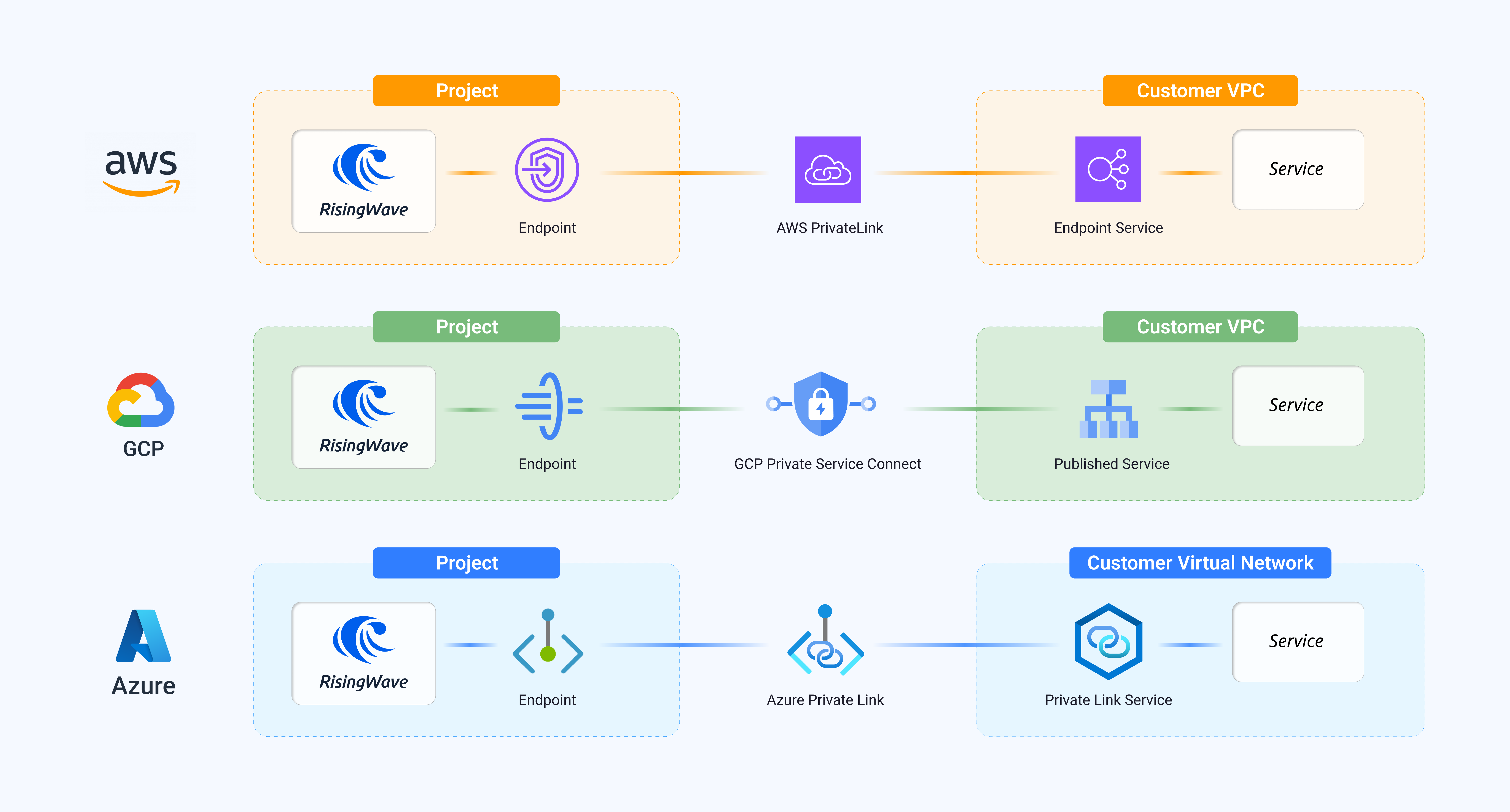
The diagram below depicts a high-level overview of how PrivateLink service works. All three platforms share the same pattern of network structure so that you can configure them in the same way automatically.
 All data transmitted through PrivateLink connections is automatically encrypted in transit. Additionally:
* For AWS PrivateLink: Communication is secured using AWS's internal network and TLS encryption
* For GCP Private Service Connect: Data is encrypted using Google's internal network encryption
* For Azure Private Link: Traffic is automatically encrypted within the Microsoft backbone network
On the **RisingWave Cloud** side, RisingWave Cloud will create an endpoint (specifically an AWS VPC endpoint, GCP Private Service Connect endpoint, or Azure private endpoint) and bind it with one running RisingWave project.
On the **Customer** side, you need to set up a PrivateLink service (specifically an AWS endpoint service, GCP published service, or Azure Private Link service) in your VPC network first.
## Serving PrivateLink (connect to RisingWave Cloud from your VPC)
In addition to connecting RisingWave Cloud to services in your VPC, RisingWave Cloud also supports **Serving PrivateLink** — currently available only for AWS — a reverse path that lets you connect *to* RisingWave Cloud privately from your own AWS VPC.
On AWS, With Serving PrivateLink, RisingWave Cloud creates an AWS endpoint service. You then create an [Interface VPC Endpoint](https://docs.aws.amazon.com/vpc/latest/privatelink/create-interface-endpoint.html) in your AWS account to connect to it. All traffic between your VPC and RisingWave Cloud stays on the AWS internal network.
The **Serving PrivateLink** section on the **Cloud Meta** tab (in **Connection** → **Cloud Meta**) exposes two fields:
* **Endpoint Service Name** — the name of the AWS endpoint service created by RisingWave Cloud. Use this value when creating an Interface VPC Endpoint in your own AWS account.
* **Private Endpoint** — the hostname to use in your connection strings once the Interface VPC Endpoint is available.
See [Cloud metadata](/cloud/cloud-metadata#serving-privatelink) for step-by-step instructions on using these fields.
## Accessing PrivateLink in the Console
In the [RisingWave Cloud Console](https://cloud.risingwave.com), go to your project and click **Connection** in the left sidebar. Then select the **PrivateLink** tab to create and manage PrivateLink connections.
When setting up an AWS endpoint service, add the **PrivateLink Principal** from your project's **Cloud Meta** tab ([Cloud metadata](/cloud/cloud-metadata)) to the service's allowed principals list so that RisingWave Cloud can connect.
All data transmitted through PrivateLink connections is automatically encrypted in transit. Additionally:
* For AWS PrivateLink: Communication is secured using AWS's internal network and TLS encryption
* For GCP Private Service Connect: Data is encrypted using Google's internal network encryption
* For Azure Private Link: Traffic is automatically encrypted within the Microsoft backbone network
On the **RisingWave Cloud** side, RisingWave Cloud will create an endpoint (specifically an AWS VPC endpoint, GCP Private Service Connect endpoint, or Azure private endpoint) and bind it with one running RisingWave project.
On the **Customer** side, you need to set up a PrivateLink service (specifically an AWS endpoint service, GCP published service, or Azure Private Link service) in your VPC network first.
## Serving PrivateLink (connect to RisingWave Cloud from your VPC)
In addition to connecting RisingWave Cloud to services in your VPC, RisingWave Cloud also supports **Serving PrivateLink** — currently available only for AWS — a reverse path that lets you connect *to* RisingWave Cloud privately from your own AWS VPC.
On AWS, With Serving PrivateLink, RisingWave Cloud creates an AWS endpoint service. You then create an [Interface VPC Endpoint](https://docs.aws.amazon.com/vpc/latest/privatelink/create-interface-endpoint.html) in your AWS account to connect to it. All traffic between your VPC and RisingWave Cloud stays on the AWS internal network.
The **Serving PrivateLink** section on the **Cloud Meta** tab (in **Connection** → **Cloud Meta**) exposes two fields:
* **Endpoint Service Name** — the name of the AWS endpoint service created by RisingWave Cloud. Use this value when creating an Interface VPC Endpoint in your own AWS account.
* **Private Endpoint** — the hostname to use in your connection strings once the Interface VPC Endpoint is available.
See [Cloud metadata](/cloud/cloud-metadata#serving-privatelink) for step-by-step instructions on using these fields.
## Accessing PrivateLink in the Console
In the [RisingWave Cloud Console](https://cloud.risingwave.com), go to your project and click **Connection** in the left sidebar. Then select the **PrivateLink** tab to create and manage PrivateLink connections.
When setting up an AWS endpoint service, add the **PrivateLink Principal** from your project's **Cloud Meta** tab ([Cloud metadata](/cloud/cloud-metadata)) to the service's allowed principals list so that RisingWave Cloud can connect.