> ## Documentation Index
> Fetch the complete documentation index at: https://docs.risingwave.com/llms.txt
> Use this file to discover all available pages before exploring further.
# Building a RAG system on RisingWave
> Build a Retrieval-Augmented Generation (RAG) system with RisingWave that answers questions based on the documentation.
## Overview
In this tutorial, you will learn how to build a RAG system in RisingWave that answers questions about its own features. The system ingests data from the [RisingWave documentation](https://docs.risingwave.com/) and stores both the document content and their embeddings.
When a user asks a question, the system generates an embedding for the query, retrieves the most similar documents from the vector database, and calls an LLM to generate an answer based on the retrieved content.
## Prerequisites
* Install and run RisingWave. For detailed instructions on how to quickly get started, see the [Quick start](/get-started/quickstart/) guide.
* Ensure you have a valid [OpenAI API key](https://platform.openai.com/api-keys) and set it as the `OPENAI_API_KEY` environment variable below.
## Step 1: Set up the data pipeline
When the server started, create the necessary tables and materialized views to build up the data pipeline.
```sql theme={null}
CREATE TABLE documents (
file_name VARCHAR,
content TEXT,
PRIMARY KEY (file_name)
);
-- Create a SQL UDF to avoid writing API key multiple times.
CREATE FUNCTION text_embedding(t VARCHAR) RETURNS REAL[] LANGUAGE sql AS $$
SELECT openai_embedding('your-openai-api-key', 'text-embedding-3-small', t)
$$;
CREATE MATERIALIZED VIEW document_embeddings AS
WITH t AS (
SELECT
*, text_embedding(content) AS embedding
FROM documents
)
SELECT
file_name,
content,
embedding
FROM t
WHERE embedding IS NOT NULL;
```
## Step 2: Load data
For this demo, we use the documents from the RisingWave docs.
```bash theme={null}
git clone https://github.com/risingwavelabs/risingwave-docs.git
cd risingwave-docs
# Load all the documents (`.mdx` files) into the `documents` table
find . -name "*.mdx" | while read -r file; do
content=$(cat "$file" | sed "s/'/''/g")
sql_statement="INSERT INTO documents (file_name, content) VALUES ('$file', '$content') ON CONFLICT (file_name) DO UPDATE SET content = EXCLUDED.content;"
echo "$sql_statement" | psql -h 127.0.0.1 -p 4566 -d dev -U root
echo "Processed: $file"
done
```
## Step 3: Query data
To compare the similarity between the question and the documents, we need to introduce the `cosine_similarity` UDF.
```sql theme={null}
CREATE FUNCTION cosine_similarity(v1 real[], v2 real[]) RETURNS real LANGUAGE rust AS $$
fn cosine_similarity(a: &[f32], b: &[f32]) -> f32 {
let dot_product: f32 = a.iter().zip(b).map(|(a, b)| a * b).sum();
let norm_a: f32 = a.iter().map(|a| a * a).sum();
let norm_b: f32 = b.iter().map(|b| b * b).sum();
dot_product / (norm_a * norm_b).sqrt()
}
$$;
```
Now, we can use the `document_embeddings` materialized view to answer questions.
The following SQL uses the `text_embedding` UDF to embed the question, and then finds the top 10 most similar documents from the `document_embeddings` materialized view.
```sql theme={null}
WITH question_embedding AS (
SELECT text_embedding('write a Python UDF') as embedding
LIMIT 1 -- Hack: ensure the function is called once only
)
SELECT
d.file_name,
d.content,
cosine_similarity(d.embedding, q.embedding) as similarity
FROM document_embeddings d
CROSS JOIN question_embedding q
ORDER BY similarity DESC
LIMIT 10;
```
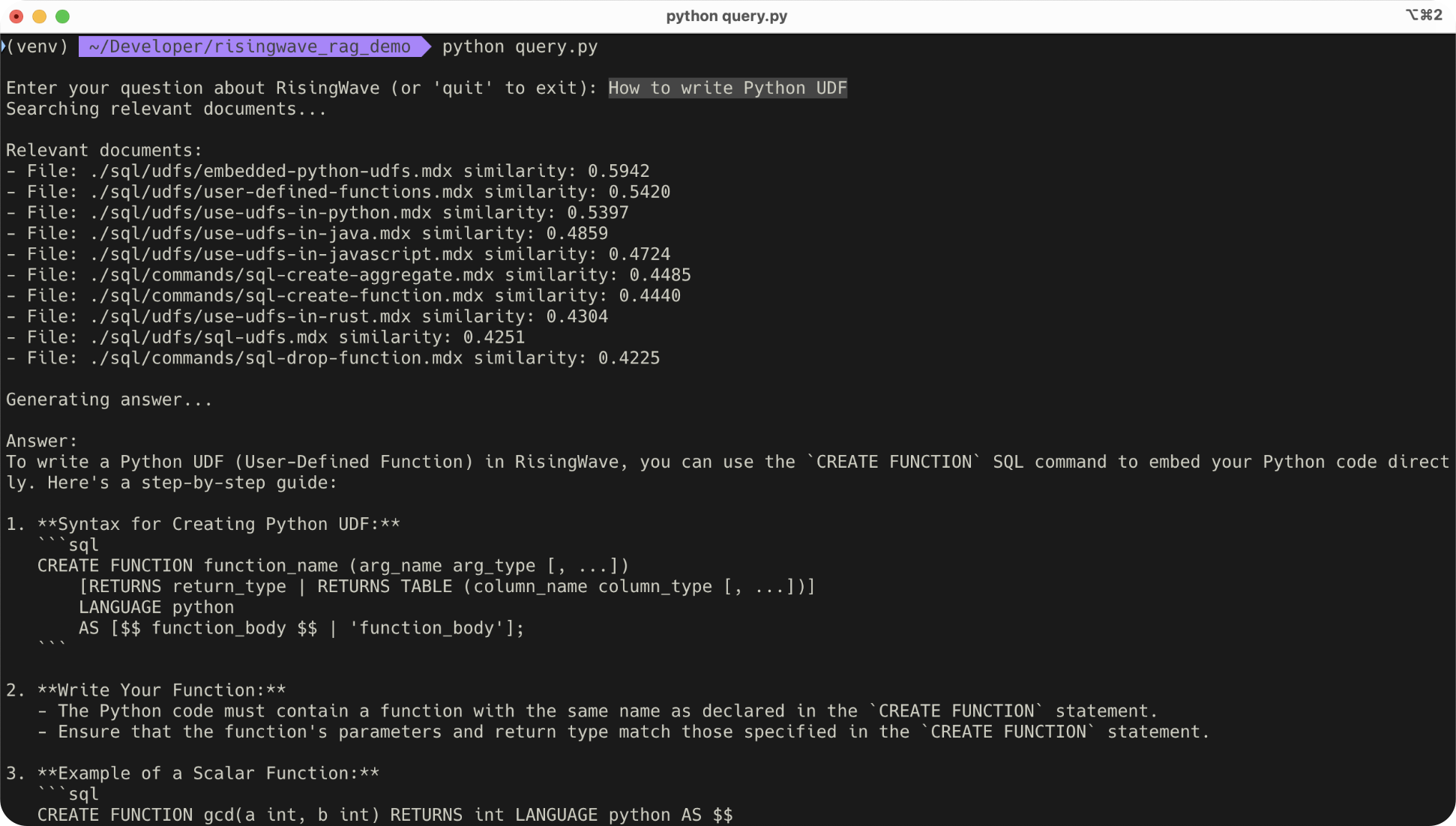
For your convenience, we provide a Python script to answer questions.
```bash theme={null}
python query.py
```
 ## Summary
In this tutorial, you learn:
* How to use RisingWave's materialized views and UDFs to create a data pipeline for storing and querying vector embeddings.
* How to perform a semantic search in SQL to retrieve relevant documents for answering user questions.
## Summary
In this tutorial, you learn:
* How to use RisingWave's materialized views and UDFs to create a data pipeline for storing and querying vector embeddings.
* How to perform a semantic search in SQL to retrieve relevant documents for answering user questions.