

If you are running self-hosted RisingWave (Operator/Helm/bare metal), use Ingest data from webhook. The same
webhook table can also accept WebSocket ingest at ws://<frontend-host>:4560/ingest/<database>/<schema>/<table>.How managed WebSocket routing works
In managed RisingWave Cloud, WebSocket ingest connections are accepted by RWProxy over WSS and forwarded to your cluster’s frontend ingest listener.- Public ingress: WSS
:443 - Ingest path format:
/ingest/<database>/<schema>/<table>
- Hosted projects: SNI hostname first, then
tenantquery parameter fallback. - BYOC projects: currently use the
tenantquery parameter (SNI is not supported).
Prerequisites
- A running RisingWave Cloud cluster.
- The tenant identifier of your cluster (for example,
rwc-g1huxxxxxx-mycluster). - A
webhooktable in your target database/schema.
Hosted vs BYOC requirements
Use the Cloud Portal WebSocket ingest wizard (recommended)
Use the wizard as the primary setup path so you do not need to manually construct hostnames, endpoint URLs, or signature validation SQL. Wizard steps:- Go to the RisingWave Cloud dashboard, open your cluster, and select Data Catalog in the cluster navigation.
- Click Create source.
- Open WebSocket ingest.
- Select Database, Schema, and Target table.
- If you do not have a target table yet, click Create table, enter the table name and signature settings, choose how the signing key is stored (RisingWave secret recommended, or Inline SQL literal), review the generated SQL, and create the table. The wizard executes the steps in order: first creates the signing secret (if using the managed option), then creates the target table.
- Copy the generated Endpoint.
- Expand Wire format and Client demo to copy the generated init frame, DML batch examples, and client template.
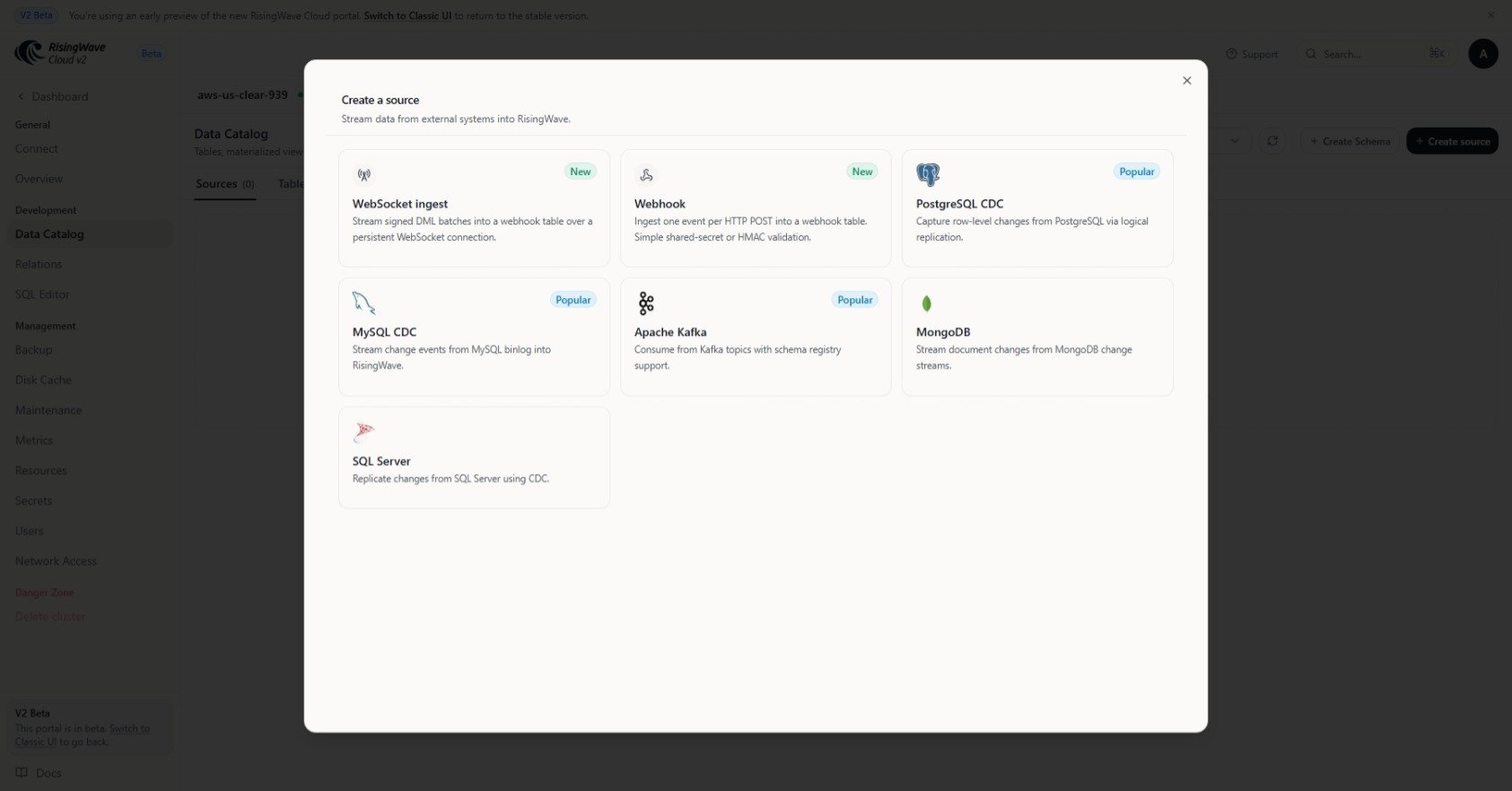
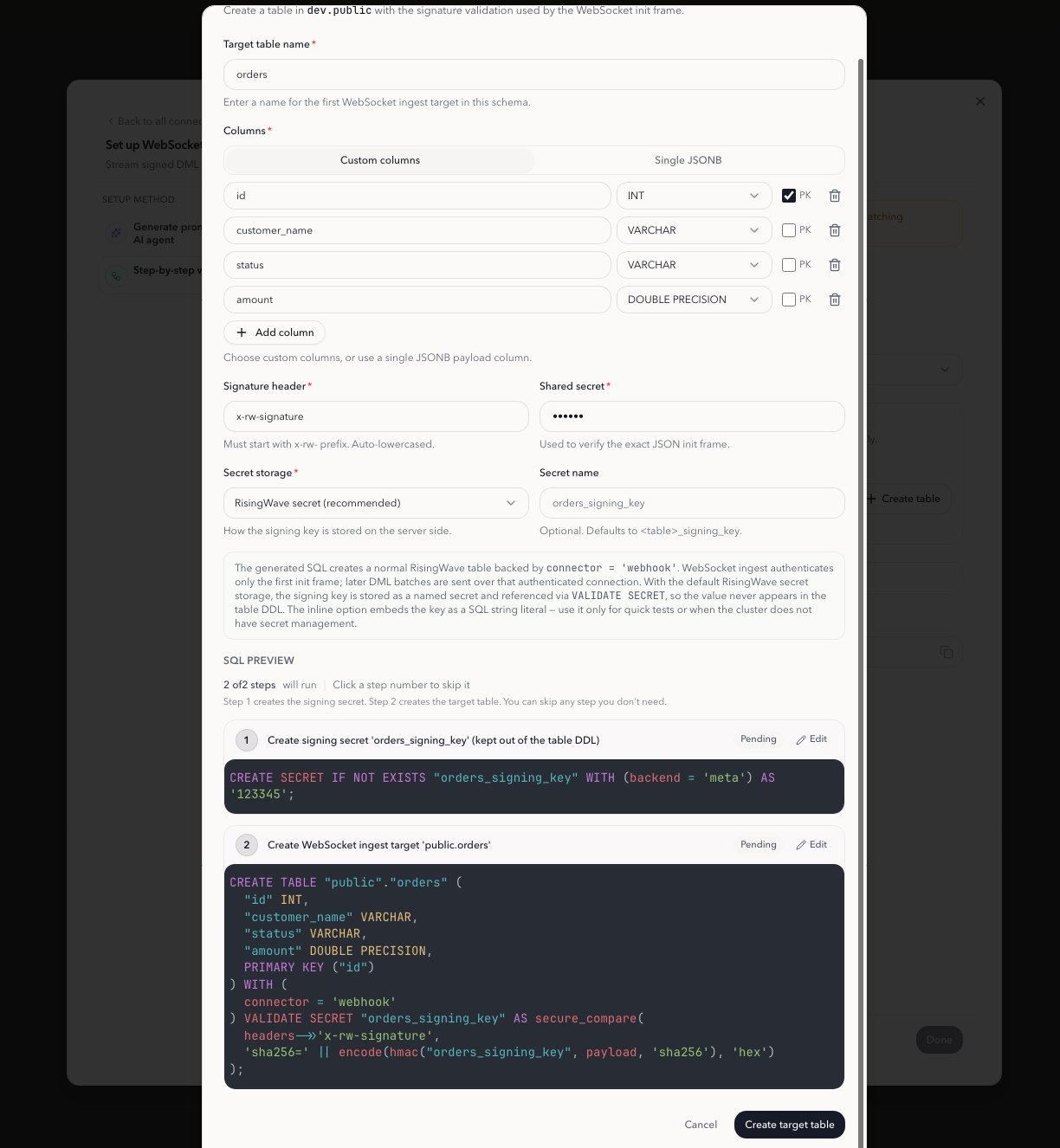
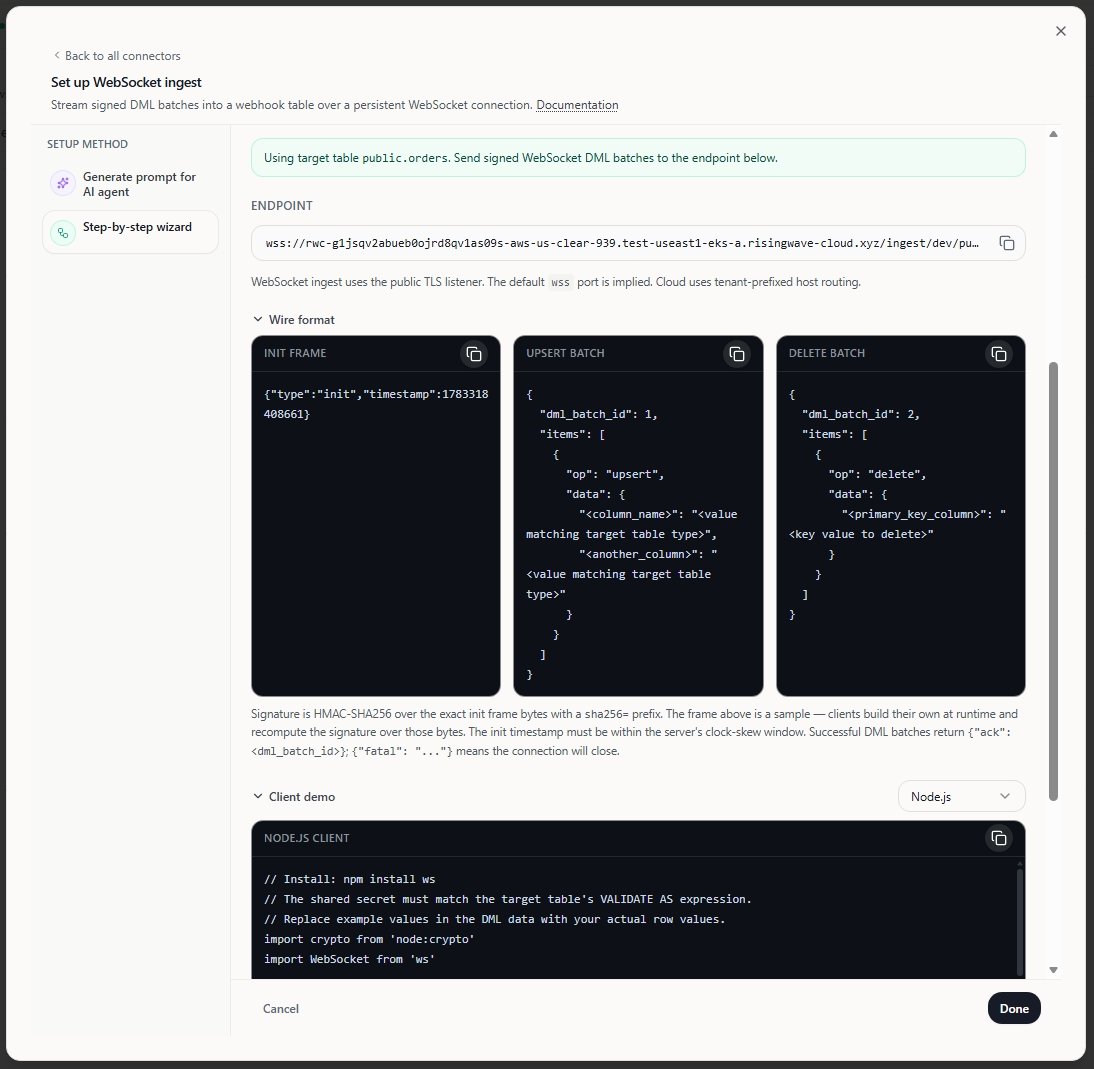
If WebSocket ingest does not appear in your Cloud Portal yet, use the manual endpoint format below as a fallback.
Manual endpoint format
In hosted projects, use the following URL format:Reference SQL and client example
Use these as reference commands. In practice, prefer the wizard-generated SQL, endpoint, and client template. Create a WebSocket ingest target table The client signs the init frame with HMAC-SHA256 using a shared secret and sends the signature in thex-rw-signature handshake header. Only the init frame is validated; subsequent DML batch frames are not signed. In the VALIDATE expression, payload is the init frame text and headers is the HTTP upgrade header map.
Store the signing key as a RisingWave secret and reference it by name (recommended):
Protocol reference
Use the following protocol after connecting to the WebSocket endpoint:- Handshake header:
x-rw-signature: sha256=<hmac_of_init_message> - First frame:
{"type":"init","timestamp":<epoch_ms>} - DML batch frame:
{"dml_batch_id":<u64>,"items":[{"op":"upsert|insert|update|delete","data":{...}}]} - Server ack:
{"ack":<dml_batch_id>} - Fatal error:
{"fatal":"<reason>"}
- The init frame must be the first text frame.
timestampmust be a non-negative epoch millisecond within the configured clock-skew window.dml_batch_idmust increase monotonically within a connection.- Empty batches are valid and are acknowledged immediately.
- Non-empty batches are acknowledged after the batch is accepted downstream.
- Any fatal error closes the connection.
insertandupdateuse the same upsert-style row handling asupsert.- Each DML batch is sent as one WebSocket text frame.
Frame-size limits
Each DML batch is a single WebSocket text frame. The server enforces a maximum frame size:- RisingWave Cloud: RWProxy rejects frames larger than 10 MiB by default (configurable via the
ingestMaxMessageSizesetting). An oversized frame closes the connection with WebSocket code1009before any ack is sent. - Self-hosted: the
tungsteniteWebSocket library (used by RisingWave’s frontend without overriding the default) allows up to 16 MiB per frame.
Reconnect and replay behavior
- Delivery is at least once.
- If the connection closes after you send a batch but before you receive its ack, reconnect and replay every batch sent after the last acked
dml_batch_id. - Replaying keyed upserts is idempotent because the primary key determines the final row state. Replaying append-only data without a key can produce duplicates.
Python client example
This example computes the HMAC of the init frame, opens the WebSocket connection, sends one batch, and waits for the ack.HTTP webhook vs WebSocket ingest
Troubleshooting
- Invalid signature: recompute
x-rw-signaturefrom the exact init frame bytes. - Stale or skewed init timestamp: regenerate the init frame immediately before connecting.
- Non-monotonic
dml_batch_id: increase the batch ID for every batch sent on the same connection. - Missing primary key fields: include all PK columns for
upsert,insert,update, anddelete. - JSON decode failures: verify field names and value types in each batch item.
- Connection closed with no ack after a large batch: your client likely exceeded the WebSocket frame-size limit. Split the batch into smaller frames and keep each batch below 8 MiB.
- Connection closed before you received the last ack: reconnect, then replay every batch sent after the last acked
dml_batch_id.